AMBF Simulation Setup
The Asynchronous Multi-Body Framework (AMBF)
simulator, Version 3.0, along with the
Surgical Robotics Challenge Assets (icra2026-challenge branch),
are installed on the AMBF Simulation PC in the competition area.
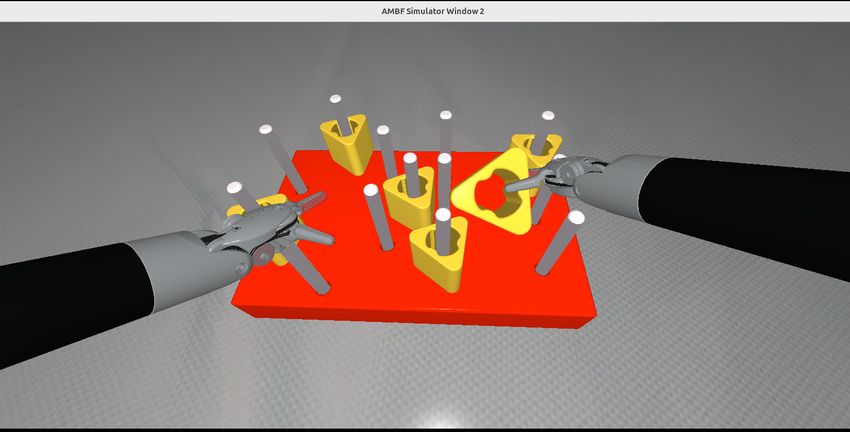
The simulation environment is similar to the one below. There are two da Vinci large needle drivers and a pegboard with posts on either side of a large wall. There are two pegs, each with a different color (blue or red).
The virtual stereo camera emulates the OAK-D-SR camera used in Physical dVRK setup. In particular, the stereo baseline is 20 mm, the FOV is 80 deg (H), 55 deg (V), and the resolution is 1280 x 800.
Human Teleoperation Peg Transfer Challenge
No preparation is necessary – please come to the competition area and give it a try!
You will use a Quest 3 HMD, with hand controllers, as the interface to control the simulated PSMs.
Autonomous Peg Transfer Challenge
Competitors for the Autonomous Peg Transfer Challenge should develop algorithms that interface with the AMBF simulator, via the ROS2 API, using one of the following options:
Option 1: Run your algorithm on your own computer
Your computer should be running ROS2 Jazzy and can interface to the AMBF simulation computer via a local area connection.
Option 2: Run your algorithm on the AMBF Simulation computer
We will create a separate login account for your team, using the account name requested on the registration form.
Following are the specifications for the AMBF Simulation computer:
| CPU | 12th Gen Intel Core i7-12700, 20 cores |
| GPU | NVIDIA GeForce RTX 3060, 12GB |
| RAM | 64GB |
Packages Installed: ROS2, AMBF, Surgical Robotics Challenge Assets
Offline Development and Testing
If you wish to create the AMBF simulation environment on your own computer, please follow the detailed instructions here
We recommend using ROS2 on Ubuntu 24.04.